
Content Studio / Getting Started
Installing Content Studio
Add Content Studio to an Elements project and prepare it for configuration.
Before You Install
Obtain the official Content Studio component package supplied for your installation. Keep the original package in a safe location so it can be installed again if needed.
Install Content Studio
1. Open the supplied Content Studio package with RapidWeaver Elements.
2. Allow Elements to complete the installation.
3. Open the Elements project where you want to use Content Studio.
4. If the component list does not refresh after registration, quit and reopen Elements before troubleshooting further.
Confirm the Components Are Available
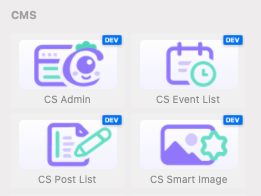
Open the Components library and locate the CMS group. After installation, the Content Studio components appear with a CS prefix in Elements.
Confirm that CS Admin, CS Post List, CS Event List, and CS Smart Image are present. These are the four components used throughout this manual.
If the Components Do Not Appear
First restart Elements and check the CMS group again. If the components are still missing, confirm that you opened the intended Content Studio package. The troubleshooting section covers further checks.