
Content Studio / Components
Event List Component
Display Events with the Event List component and configure event listings.
What This Component Does
The Event List component reads published Content Studio events and presents upcoming, past, or combined listings on a public page. Dated events use their date and an unpadded 12-hour public time such as 4:00 PM. Recurring events use their recurring label and graphic instead of a dated occurrence.
Choose a Layout
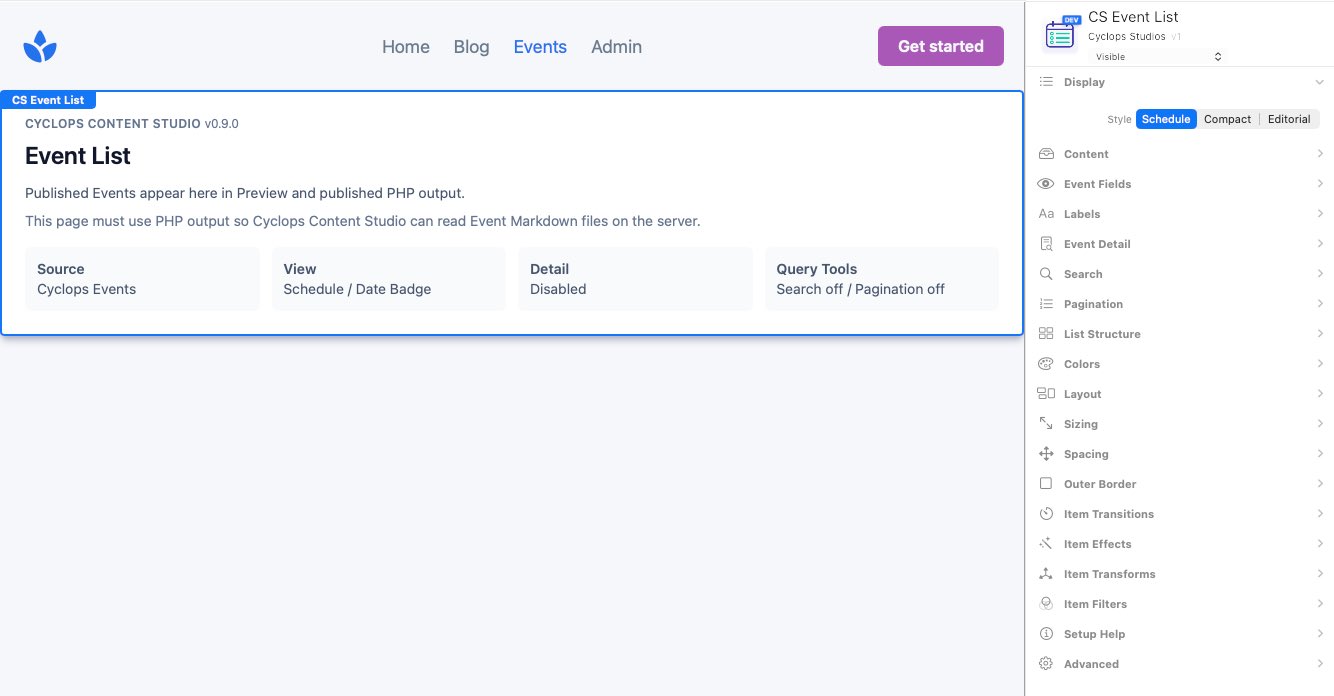
Schedule emphasizes dates in a structured list. Compact provides a concise repeated item with optional imagery. Editorial creates a visual multi-column presentation for featured events.
Choose Which Events Appear
Event Group can show Upcoming Only, Upcoming and Past, or Past Only. Event Limit accepts 0–100; 0 includes all matching published events. Optional group headings label the Upcoming Events and Past Events sections.
Choose Event Fields
Show or hide time, venue, location, tags, details, and group headings. Schedule and Compact can show descriptions and status; Compact can also show an image. Set the Details and empty-state labels, and control description length where available.
Compact Images
When Compact images are enabled, each event shows at most one image: a usable banner first, otherwise the recurring graphic, otherwise text only. Aspect ratio, object fit, and focal position apply to banners. Image Side sets Left for desktop image/content rows or Top for image-above-content; both stack cleanly on mobile. Gap, Item Padding, Action Position, and Item Borders apply to Compact items.
Editorial Options
Editorial supports 2, 3, or 4 columns, item gap and padding, its own background and text colors, and an optional View All Dates link. A recurring graphic occupies the equivalent date/media region and its recurring label remains readable; a missing or broken graphic collapses cleanly.
Event Details, Search, and Pagination
Detail on Page enables a full event view with editable detail, back, and not-found labels. Detail Page may point elsewhere or remain blank for the same page. Optional search and pagination provide their own labels, 1–24 events per page, 3–9 visible page links, and left, center, or right alignment.
Schedule Appearance
Schedule uses one fixed Medium presentation for V1. Dated events use the Medium date badge; recurring events use their recurring graphic in the equivalent slot and keep the recurring label visible. Available controls are Separators, Separator Width, Date Format, Month Format, Badge Radius, and the related theme colors. Outer Border applies once around the complete list.